


A stale, dry bedroom can wreck your sleep without warning. Dry air pulls moisture from your skin and throat overnight, and overly humid air invites dust mites and that clammy morning feeling you can’t quite shake. A bedroom hygrometer gives you the actual numbers so you can tune a humidifier, dehumidifier, or AC to the comfort zone most sleep experts talk about.
These eight picks cover the spread from a simple plug-and-read unit to app-connected sensors that log a year of data. Each one was picked for a specific kind of bedroom user, and the buying guide below spells out what separates a useful sensor from a paperweight.
The Leading Options At A Glance

DOOMAY Hygrometer Indoor Temperature Humidity Monitor

GoveeLife Bluetooth Hygrometer Thermometer H5110 3-Pack
X-Sense Wi-Fi Thermometer Hygrometer with LCD

BaldrTherm Smart WiFi Hygrometer Thermometer 1 Pack

Govee WiFi Thermometer Hygrometer H5179
Govee Hygrometer Thermometer 3 Pack with Gateway

Govee Indoor Hygrometer Thermometer H5075

SwitchBot Thermometer Hygrometer 2 Pack with LCD
Inside Each Recommended Option
Bedrooms that need a glance-and-go readout without apps or Wi-Fi pairings are exactly where this DOOMAY unit earns its keep. The display gives you current temperature and humidity in large, readable digits, and the calibration dial on the back lets you nudge readings by several degrees or percentage points when one sensor disagrees with another in the same room.
You won’t find cloud history or app notifications here, and that’s the point. Place it on a nightstand or shelf, glance at it before bed, and you’re done. Compared to the GoveeLife Bluetooth Hygrometer Thermometer H5110 reviewed later, this one trades smart features for pure simplicity.
Where It Delivers
- Manual calibration range of plus or minus 5 degrees Celsius and plus or minus 10 percent humidity lets you reconcile readings across rooms.
- 24-hour max and min tracking shows you the swing between afternoon humidity and your dry overnight air.
- Comfort indicator face icons translate the raw numbers into a simple wet, dry, or comfortable reading at a glance.
- Completely standalone design means no phone, hub, or Wi-Fi is needed to see live data.
Things To Consider
- Lacks any wireless or app connection, so you can’t pull history to your phone or get remote alerts.
- Plastic housing tends to feel light on a nightstand and may shift if bumped.
Who It Suits Best
New parents outfitting a nursery and anyone who wants a no-fuss screen on a nightstand rather than another app to check.
A Better Fit Elsewhere
The BaldrTherm Smart WiFi Hygrometer Thermometer suits you better if you need alerts and history on your phone.
Three bedrooms, three readings, one phone app. The GoveeLife H5110 ships as a 3-pack of mini sensors that each report back through Bluetooth to the Govee Home app, giving you a quick comparison of how your master bedroom stacks up against the kids’ rooms without buying a hub first.
Each unit is small enough to disappear on a shelf and includes a lanyard loop for hanging inside a closet or a guitar case. The Bluetooth range stretches to roughly 262 feet in open air, which is plenty for most homes but worth flagging in older properties with thick walls. Compared to the DOOMAY unit above, the trade-off is that you need your phone to read history, while the DOOMAY works fully offline.
Points In Its Favor
- Three sensors in one box let you monitor bedroom, nursery, and basement from a single phone app.
- Bluetooth range around 262 feet covers most homes without a separate hub or Wi-Fi setup.
- Compact build with a lanyard slot fits on a shelf, inside a closet, or hanging in a humidor.
- Remote alarm feature in the app pings your phone when humidity strays outside your set range.
Worth Noting
- Bluetooth-only means readings stop if your phone leaves range, unlike the Wi-Fi-based BaldrTherm Smart WiFi Hygrometer Thermometer covered next.
- Battery compartments on the small sensors are commonly reported to need fresh cells every few months in busy households.
Made For
Households that want quick snapshots in several rooms without committing to a full Wi-Fi smart home setup.
Look Elsewhere When
The Govee Hygrometer Thermometer 3 Pack with Gateway is the right call when you need sensors that talk to your phone from anywhere, not just when you’re home.
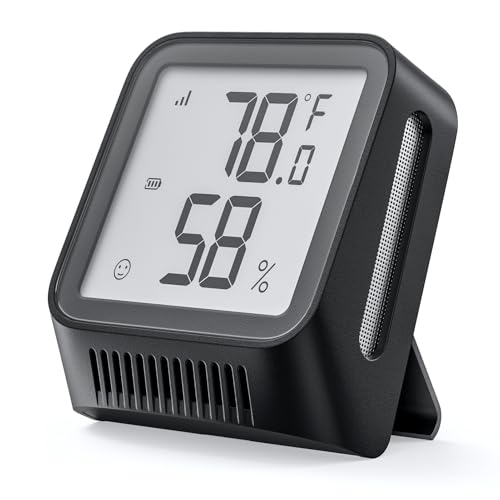
Owners of an X-Sense smart home system already know the SBS50 base station sitting on their counter. This X-Sense Wi-Fi Thermometer Hygrometer piggybacks on that hub, turning the screen you’re already used to into a remote reading you can pull from anywhere through the X-Sense app.
The catch is right in the product name: the base station is not included. If you don’t already run X-Sense alarms or smart devices, the cost of buying the hub just to read one sensor in your bedroom is hard to justify. Inside an established X-Sense household, though, the pairing is fast and the LCD keeps the reading visible even when the phone is in another room.
The Upside
- Wi-Fi link through the SBS50 base station lets you check bedroom conditions from the office or on the road.
- LCD readout stays useful as a standalone glance-screen even without the app open.
- Plugs into the same ecosystem you may already use for smoke and water leak detectors.
Trade Offs
- Requires the separately sold SBS50 base station, which adds cost for first-time X-Sense shoppers.
- App-only setup can be awkward to configure on certain mesh routers.
Best Suited To
Existing X-Sense smart home owners who want one more sensor on the same network without adding a different app.
Swap It Out When
The BaldrTherm Smart WiFi Hygrometer Thermometer is the more flexible Wi-Fi pick if you don’t already own an X-Sense base.
The BaldrTherm Smart WiFi Hygrometer Thermometer is built for the bedroom user who wants more than a screen on the wall. It connects directly to Wi-Fi and pushes readings to the Baldr app, where you can set threshold alerts, review long-term graphs, and check humidity from the road before you get home.
The brand markets a professional-grade sensor for higher precision, and the app stores historical data that helps you correlate dry winter air with your morning congestion. The unit is sold in 1-pack, 3-pack, and 6-pack variants, so you can start with one bedroom and scale up later. Where the SwitchBot Thermometer Hygrometer below leans on a large LCD for at-a-glance reading, this one leans on the app for everything except the current number.
Useful Strengths
- Wi-Fi connection means you can check bedroom conditions from your phone anywhere with cell service.
- Historical data storage in the app helps you spot seasonal patterns and justify a humidifier upgrade.
- Threshold alerts notify you the moment humidity leaves your set comfort band.
- Multi-pack options let you expand to wine cellars and basements using the same app.
Some Limits To Know
- Heavier app reliance than the DOOMAY unit means you lose the quick glance if your phone isn’t nearby.
- Some widely reported setups mention minor pairing hiccups on 5 GHz networks, so a 2.4 GHz Wi-Fi band helps.
Right Fit For
Travelers and remote homeowners who want alerts and history on their phone, not just a number on a nightstand screen.
A Better Fit Elsewhere
The Govee WiFi Thermometer Hygrometer H5179 is a comparable Wi-Fi option that some shoppers may prefer for its Swiss sensor branding.
The Govee H5179 is the workhorse of the Govee smart sensor line, pairing a Swiss-made humidity and temperature sensor with both Wi-Fi and Bluetooth connectivity to the Govee Home app. You get remote alerts, free app graphing, and fast refresh rates without needing a separate gateway.
The unit supports 2.4 GHz Wi-Fi networks but not 5 GHz, which matters for anyone with a newer mesh router that bands them together. Once connected, the readings stay reliable enough for everyday bedroom decisions like when to kick on the humidifier before you go to sleep. Compared to the BaldrTherm Smart WiFi Hygrometer Thermometer reviewed above, the Govee brings a more established app ecosystem and longer track record.
Everyday Perks
- Swiss-made sensor delivers consistent readings, with the brand claiming plus or minus 0.54 degrees Fahrenheit accuracy.
- Dual Wi-Fi and Bluetooth paths give you app access at home and remote alerts when you’re out.
- App data export and graphing help you track humidity trends across months, not just hours.
Honest Caveats
- No 5 GHz Wi-Fi support can complicate the first-time setup on certain mesh systems.
- The plastic shell sits a little bulky on a small nightstand compared to the compact GoveeLife H5110 sensors.
Perfect Match For
Anyone planning to keep this sensor for years and review long-term bedroom humidity graphs through a mature app.
Where Another Pick Shines
The GoveeLife Bluetooth Hygrometer Thermometer H5110 3-Pack covers more rooms if you don’t need remote Wi-Fi access.
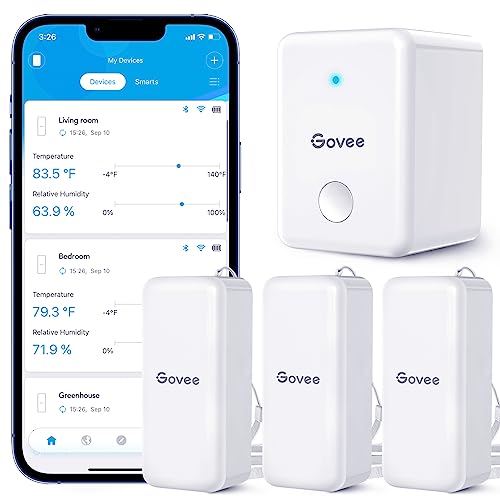
The standout feature of this Govee 3-pack is the included Wi-Fi gateway, the small bridge that lets the included H5100 sensors talk to your router from anywhere in the home. Drop one sensor in the bedroom, one in the living room, and one in the basement, and you read all three from the Govee Home app while you’re at work.
Only the H5100 sensor model pairs with this particular gateway, so you can’t mix older Govee units into the same setup. Buyers commonly report that the gateway needs to live near your router with a clear line of sight for the best range. The trade-off versus the GoveeLife H5110 3-pack above is a higher up-front cost for the remote access the Bluetooth-only version can’t deliver.
Strong Points
- Wi-Fi gateway unlocks remote sensor readings from anywhere, not just within Bluetooth range.
- Three-room coverage out of the box suits apartments and small homes with multiple comfort zones.
- Swiss-made sensors across all three units help keep readings consistent room to room.
Points To Note
- Only the H5100 sensor model pairs with the included gateway, limiting future expansion to that model line.
- Gateway placement near the router reduces clutter but can shorten the effective range in long homes.
Who Should Grab It
Shoppers outfitting a whole home or apartment with three or more rooms to monitor from a single app.
Not Your Match When
The Govee WiFi Thermometer Hygrometer H5179 is a simpler single-room pick for bedrooms that don’t need a gateway.
The H5075 is the original Govee Bluetooth hygrometer, and it’s still a smart pick for anyone who wants app features without paying for Wi-Fi. The Swiss-made sensor inside pairs with your phone over Bluetooth up to about 164 feet, and the Govee Home app shows live readings, daily graphs, and basic comfort indicators.
There’s no remote access when you leave the house, since the unit relies on Bluetooth alone. Inside a small apartment, that’s not really a limitation, and the lower price tag makes it easy to scatter a few around. Compared to the DOOMAY unit at the top of this list, you’re paying a bit more for the app history and graphing, while the DOOMAY skips both for a smaller bill.
Good Reasons To Consider
- Bluetooth app control at a lower price than the Wi-Fi Govee H5179 covered above.
- Swiss-made sensor keeps readings accurate enough for bedroom humidifier decisions.
- App graphing turns a week of data into a clear visual, helpful for spotting dry winter patterns.
Minor Gripes
- 164-foot Bluetooth range won’t cover you once you leave the house, unlike the BaldrTherm Smart WiFi Hygrometer Thermometer.
- Small LCD face is harder to read across the room than the SwitchBot Thermometer Hygrometer’s larger screen.
Built With In Mind
Casual phone-first shoppers who want app graphs without paying for full Wi-Fi remote access.
Consider Something Else When
The GoveeLife Bluetooth Hygrometer Thermometer H5110 3-Pack is the better value if you want to cover several rooms at once.
SwitchBot built this thermometer hygrometer around one priority: a big, readable screen on your nightstand. The LCD pulls double duty as a glanceable readout and a Bluetooth relay to the SwitchBot app, where you can log data, set alerts, and export CSV files for spreadsheet nerds who like a deep dive into monthly humidity trends.
The Swiss-made sensor claims plus or minus 0.4 degrees Fahrenheit accuracy across a wide temperature range, and the data export feature is rare at this level. The 2-pack makes sense for households already running SwitchBot curtains or hubs, though newcomers may prefer a single unit. If you skip the brand’s hub, the unit still works on Bluetooth alone within about the same range as the Govee H5075 above.
Strengths Worth Knowing
- Large LCD makes the live reading easy to read from across a small bedroom.
- Swiss-made sensor with reported plus or minus 0.4 degrees Fahrenheit accuracy and 10 readings per second refresh.
- Data export to CSV lets you build a long-term humidity log in your own spreadsheet.
- Notification alerts through the app keep you posted when humidity swings hard.
A Few Limitations
- Bluetooth-only setup means no remote alerts when you leave home, unlike the BaldrTherm Smart WiFi Hygrometer Thermometer.
- Battery life on the always-on LCD screen is a commonly reported trade-off against units with dimmer displays.
Whose Shelf It Belongs On
SwitchBot smart home users and data-curious shoppers who want the biggest screen and an exportable humidity log.
Reach For A Different Pick When
The Govee WiFi Thermometer Hygrometer H5179 makes more sense if you want remote access from your phone without a hub.
What Matters When Picking A Bedroom Hygrometer
A hygrometer reads two numbers: temperature and relative humidity. Relative humidity tells you how much moisture the air is holding compared to what it could hold at that temperature, which is why a cold winter night at 40 percent can feel bone dry once the heat kicks on.
The most useful spec is accuracy, often expressed as plus or minus a few percentage points of relative humidity. A 3 percent error sounds small, but at 40 percent humidity it puts you in the same comfort range as a 43 percent reading, which can matter when you’re trying to keep humidity above 40 percent for sinus comfort.
Refresh rate matters more than people expect. A sensor that updates every 10 minutes misses the quick drops when you open a window or start a shower. The SwitchBot and the Govee Wi-Fi units refresh fast enough to catch those swings.
App features split the field. Bluetooth units like the H5075 and H5110 work fine at home but lose connection when you leave. Wi-Fi units like the BaldrTherm and Govee H5179 push alerts to your phone from anywhere, which is useful if you want a heads-up before the bedroom gets too dry for sleep.
Display size and readability matter in a dark room. A larger LCD like the one on the SwitchBot is easier to read from across the bed than the small screens on the mini GoveeLife sensors.
Power source is a quiet trade-off. Plug-in units never need batteries, while battery-powered sensors can sit on a shelf or inside a closet but need fresh cells every few months in active households.
Calibration
Manual calibration on the DOOMAY unit is a real feature for anyone who has watched two sensors in the same room disagree by 5 percent. The Swiss-made sensors in the Govee and SwitchBot lines are tightly matched out of the box, so calibration matters less unless you need lab-level precision.
Connectivity
Bluetooth keeps costs down and setup simple, but you trade remote access. Wi-Fi requires a stable 2.4 GHz network and sometimes a hub, which is the path the Govee 3-pack and the BaldrTherm take. Pick the connection that matches how you actually plan to use the data.
Display And Placement
Bedrooms reward screens you can read without glasses, especially during a midnight wake-up. A wall-mountable unit with a backlight reads better than a coin-sized LCD on a shelf. Think about where the sensor will live before you choose a size.
Getting The Most From These Picks
Traps First Timers Fall Into
The most common mistake is placing a sensor on a nightstand right next to your face. Your body heat and breath will push humidity and temperature readings far above the real room average, which makes the reading useless for humidifier decisions. Mount the unit on an interior wall, away from windows and vents, at roughly head height when you sleep.
Another slip-up is trusting a single number. Humidity swings between afternoon and overnight are normal, and the 24-hour min/max tracking on the DOOMAY unit exists to show you that swing. A sensor without history hides whether your bedroom is briefly dry at 3 a.m. or just dry all day.
Where The Extra Money Goes
Wi-Fi connected units like the Govee H5179 and the BaldrTherm cost more because of the radio, the app backend, and the longer battery engineering. You pay for remote alerts and cloud history, which matter when you travel or run a vacation rental.
Multi-pack options spread that cost across rooms, which is why the Govee 3-pack and the GoveeLife H5110 3-pack sit at strong value points for whole-home coverage. The Swiss sensor branding on the Govee and SwitchBot lines is a real accuracy upgrade, not marketing fluff, and it’s worth the small premium if you plan to keep the unit for years.
Frequently Asked Questions
What humidity level is best for a bedroom?
Most sleep comfort guidance points to 40 to 60 percent relative humidity, with around 45 percent often cited as a sweet spot. Below 40 percent, you risk dry sinuses and scratchy throats by morning, and above 60 percent you invite dust mites and musty bedding.
Where should I place a bedroom hygrometer?
Mount it on an interior wall at roughly head height when you sleep, away from windows, doors, heating vents, and your nightstand. A spot in the middle of the room, or on a far wall, gives a more accurate reading than the bedside table.
Do I need a Wi-Fi hygrometer or is Bluetooth enough?
Bluetooth works fine for at-home glance readings and short-term graphs, which suits many casual users. Wi-Fi adds remote alerts and continuous logging from anywhere, which matters for travelers, vacation rental owners, and anyone who wants humidity data they can check on a lunch break.
How often should I replace batteries in a wireless sensor?
Most Bluetooth sensors in this list use coin or AAA cells that last several months in typical use, while Wi-Fi units tend to drain faster. Plan on fresh batteries every 2 to 6 months, depending on connection type and refresh settings.
Can one hygrometer cover multiple rooms?
One sensor only reads the room it sits in, since humidity varies widely between a bathroom and a bedroom. For whole-home coverage, a 3-pack like the Govee or GoveeLife options spreads the cost across several rooms and keeps the data in one app.
Wrap Up
A bedroom hygrometer pays for itself the first time it tells you that your winter air is dipping into the 25 percent range at 2 a.m. The DOOMAY unit is the easiest entry point, the Govee H5179 is the long-term workhorse, and the SwitchBot 2-pack wins for the biggest screen and best data export. Pick the one that matches how you actually plan to use the data, and you’ll sleep better for it.