


Indoor humidity shapes everything from how well you sleep to whether your wooden floors start cupping next winter. A reliable home humidity sensor gives you actual numbers instead of guessing whether the air feels sticky, dry, or just right. The seven models below cover everything from a basic bedroom hygrometer to a Bluetooth node that talks to your smart home hub, so you can match the sensor to the room, the climate, and the level of detail you actually want.
The Lineup, Simplified

RuuviTag Pro 4in1 Wireless Bluetooth Humidity Sensor

Antonki 2 Pack Room Thermometer Indoor Hygrometer
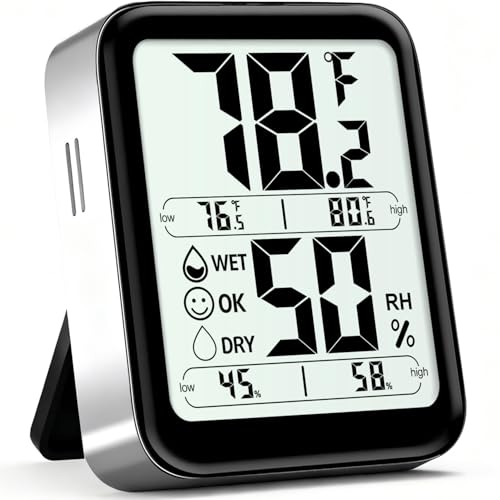
Antonki Indoor Thermometer Hygrometer with Max/Min Records
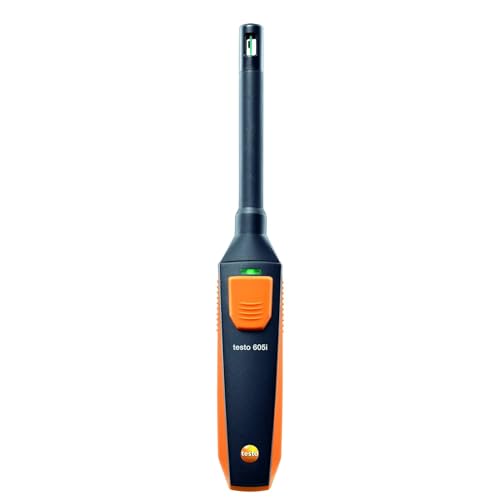
Testo 605i Bluetooth Thermohygrometer with Bendable Probe

DOOMAY Hygrometer, Indoor Temperature Humidity Monitor for Nursery

GoveeLife Bluetooth Hygrometer Thermometer H5110, Mini Sensor 3-Pack

SwitchBot Thermometer Hygrometer with Swiss Sensor, 2 Pack
Taking A Closer Look At The Options
The RuuviTag Pro sits in a different league than the budget meters further down this list. It reads temperature, air humidity, and barometric pressure (the weight of the air around you, which can hint at incoming weather shifts) through a Texas Instruments TMP117 sensor, then ships that data over Bluetooth to a free Android or iOS app. For most homeowners, the appeal is the replaceable coin cell battery and the IP67 housing, which means the unit can handle a quick rinse or a damp basement without complaint.
Where the RuuviTag Pro earns its keep is in a smart home setup. It integrates with Victron, Homey, and Home Assistant, so a single sensor can feed dehumidifier automations, alert you to a frozen pipe risk in the crawl space, or log a year of greenhouse climate data. The wide operating range, from negative 40 to positive 85 degrees Celsius, also makes it a serious candidate for outdoor placement, a workshop, or a wine cellar where consumer meters tend to give up.
What Pays Off
- Texas TMP117 sensor delivers high-accuracy temperature and humidity readings you can actually trust in sensitive spaces.
- Open ecosystem support through Home Assistant, Homey, and Victron means the data flows into dashboards and automations without extra hubs.
- IP67-rated housing and a replaceable battery keep maintenance simple in basements, garages, and outdoor enclosures.
- Free companion app stores long-term history, which helps you spot seasonal humidity swings before they become mold problems.
Honest Caveats
- Bluetooth range can feel limited in a large house, so you may find yourself adding a repeater or a second node for upstairs coverage.
- Setup leans technical, and first-time smart home users may need patience to pair the tag with their preferred platform.
- No on-device display, so a quick glance at the sensor itself tells you nothing without your phone in hand.
Who It Suits Best
Smart home builders, HVAC pros, and anyone who wants long-term logging tied to automations rather than a simple wall readout.
Look Elsewhere When
The Antonki 2 Pack makes more sense for households that want two simple room readouts without a phone or hub in the loop.
Two sensors, two rooms, one small box. The Antonki 2 Pack covers the basics without any apps, hubs, or batteries to chase. Drop one in the bedroom and one in the living room and you finally know which corner of the house is dragging the rest of the air down. For most apartments, that is exactly the level of detail needed.
The meters use separate temperature and humidity sensors, which the brand says helps readings stabilize within a few minutes of powering on. The listed range runs from negative 50 to 70 degrees Celsius and 10 to 99 percent relative humidity, comfortably covering any normal indoor condition. Owners commonly report leaving them on a shelf or mounting them with a small adhesive strip, and the lack of a backlight keeps the screen readable without lighting up the room at night.
The Case For It
- Two-pack format covers multiple rooms out of the box, which removes the “which one do I unplug” question.
- No app or Bluetooth pairing required, so older family members and renters get the data without learning new software.
- Wide measurement range handles unheated basements, summer attics, and steamy bathrooms.
Points To Keep In Mind
- Readings fluctuate for the first few minutes after power-on, so a brand new unit placed in a new spot may look unreliable until it settles.
- Display contrast is modest, and you may find it hard to read across a dim room without leaning in close.
- No historical logging means you only see the current number, which limits trend-spotting over weeks or months.
Made For
Multi-room households that just want a quick glance at temperature and humidity without any smartphone setup.
Skip It When
The DOOMAY Hygrometer fits better if you want max/min history and calibration controls in a single-room nursery or greenhouse.
The single-unit Antonki leans into the kind of friendly visual feedback that the two-pack skips. A comfort icon flags the room as DRY, OK, or WET, which means you can interpret the number at a glance even if you have never thought about relative humidity before. It also tracks the highest and lowest readings since the last reset, so you can see what happened overnight or while you were at work.
Compared to the budget two-pack earlier in this list, this model targets one space more seriously. The brand lists accuracy within plus or minus 5 percent RH (relative humidity, the percentage of moisture the air can still hold at that temperature) and plus or minus 2 degrees Fahrenheit, which is plenty for monitoring a greenhouse, a terrarium, or a baby’s room. A small refresh window keeps the numbers moving, and a battery ships in the box, so you can set it up straight out of the packaging.
Useful Touches
- DRY/OK/WET comfort icon translates raw numbers into an instant read, which helps in a nursery or plant room.
- Max/min history captures overnight swings that a basic sensor would miss entirely.
- Factory accuracy ratings are tight enough for greenhouse and reptile habitat owners who need to stay within a band.
Trade Offs
- Single-unit design means you cover one room well instead of two rooms adequately.
- No connectivity, so it does not push alerts to a phone when humidity climbs while you are out.
- Display housing is small, and you may find the icons cramped if your eyesight runs to the weaker side.
Best Suited To
Plant parents, terrarium keepers, and anyone who wants a single dedicated readout with a comfort indicator rather than raw numbers.
Consider Something Else When
The SwitchBot Thermometer Hygrometer suits households that want a larger display and Bluetooth history in the same single-room format.
The Testo 605i is the odd one out in this roundup, and that is the point. It is built for hands that need to reach inside an HVAC duct, a wall cavity, or a supply register without disassembling the whole system. The probe head bends to 90 degrees, which lets you feed the sensor into tight spaces and still read the screen in a comfortable position.
For most homeowners, this is overkill. For HVAC technicians, energy auditors, and serious DIY renovators, the live data feed into a phone is the entire appeal. You can log readings as you walk the house, mark problem spots, and compare rooms on a single screen. The compact head also slips into crawl space openings and behind refrigerator coils where a chunky household meter simply will not fit.
Practical Pluses
- 90-degree bendable probe reaches inside ducts and registers that block traditional tabletop hygrometers.
- Bluetooth live data feed into the Testo app turns the phone into a logged data recorder for whole-house surveys.
- Compact head fits into crawl space openings and appliance cavities for spot checks during renovations.
Worth Noting
- Specialized tool pricing puts it well above consumer meters, which is hard to justify for a single bedroom readout.
- Probe-based design feels less natural for a permanent living room or nursery placement.
- Best value shows up only when you actually open ducts, which most homeowners rarely do.
Who Should Grab It
HVAC contractors, energy auditors, and homeowners chasing a moisture mystery inside walls, ducts, or tight cavities.
A Better Fit Elsewhere
The GoveeLife Bluetooth Hygrometer Thermometer H5110 makes more sense for whole-home coverage in multiple living spaces rather than a single diagnostic tool.
The DOOMAY hygrometer is built for one thing: keeping a single room honest. It runs a 24-hour max and min record that resets at midnight, so you wake up to a clear picture of what the nursery, basement, or home office actually did overnight. A comfort display tells you whether the air is in a friendly range without making you do the math in your head.
The feature that separates it from a basic meter is manual calibration. You can adjust the temperature by plus or minus 5 degrees Celsius and humidity by plus or minus 10 percent, which is genuinely useful if you place a new sensor next to a trusted reference unit and find a small drift. Most owners find themselves doing this once and then forgetting about it, but for greenhouse and wine cellar use, the ability to nudge the numbers is reassuring.
Where It Helps
- Manual calibration controls let you align the sensor with a trusted reference, which matters in greenhouses and cellars.
- 24-hour max/min memory makes overnight swings visible, so you stop guessing what the room did while you slept.
- Comfort indicator gives a quick visual verdict for parents and caregivers who do not want to interpret numbers.
Factors To Consider
- Calibration requires a second known-good reference, which first-time owners may not have on hand.
- No Bluetooth or Wi-Fi, so remote alerts during a long workday are out of reach.
- Single-room focus means you would need a second unit to cover the rest of the house.
Perfect Match For
Parents monitoring a nursery and hobby growers who want calibration flexibility in a single-room sensor.
Where Another Pick Suits Better
The Antonki 2 Pack suits larger homes that need readings in two rooms from one purchase instead of one focused nursery.
Three small sensors, one app, no hub required. The GoveeLife H5110 arrives in a pack of three mini nodes that pair over Bluetooth and feed data into a single phone, which makes it the easiest way to cover a living room, a bedroom, and a basement in one purchase. A small lanyard slot on each unit lets you hang them on a hook or a nail without any tools.
The Govee ecosystem is the main draw here, since the companion app tracks graphs, sends high and low alarms, and exports data when you want to spot seasonal patterns. The listed Bluetooth range reaches around 262 feet in open air, which in most homes means a sensor in the garage still talks to a phone in the kitchen. For most households, the practical limit is walls and floors, so you may find the basement sensor drops out unless you place it near the stairwell.
What Makes Sense
- Three sensors cover a typical home from a single box, removing the need to buy additional units room by room.
- App-based history and alarms let you spot humidity swings without checking each sensor manually.
- Compact form factor and lanyard slot make placement flexible on shelves, hooks, or greenhouse frames.
Potential Sticking Points
- Bluetooth-only design means the phone acts as the bridge, so remote alerts require a separate Govee Wi-Fi gateway.
- Sensor count is fixed at three, which can feel short for larger homes with more problem rooms.
- App experience is best inside the Govee ecosystem, so households using other smart home platforms may not get full value.
Right Fit For
Apartments, small homes, and families who want whole-home coverage through a single phone app rather than a hub.
Swap It Out When
The RuuviTag Pro makes more sense for smart home owners who want each sensor to feed directly into Home Assistant or a similar hub without a phone in the middle.
SwitchBot leans hard on the sensor inside the box: a Swiss-made humidity and temperature chip rated for plus or minus 2 percent RH and plus or minus 0.2 degrees Celsius accuracy. The two-pack ships with a generous LCD that is easy to read from across a room, which is a noticeable upgrade over the compact screens on the Antonki and DOOMAY models. For most living spaces, the readability alone justifies the choice.
The SwitchBot companion app logs data, sends alerts, and exports historical readings for anyone who wants a paper trail. Inside the wider SwitchBot ecosystem, the sensors can also trigger automations through the SwitchBot Hub, which closes the loop for households already invested in that platform. The operating range covers most homes comfortably, and the brand lists humidity sensitivity down to a tenth of a percent in the app view.
Noteworthy Benefits
- Swiss-made sensor delivers tighter humidity accuracy than most consumer meters at this level.
- Larger LCD improves readability across a room, which helps in living areas where you check numbers from the couch.
- Two-pack format covers two key rooms with consistent hardware and shared app history.
Honest Caveats
- Best automation features require a SwitchBot Hub, which is a separate purchase on top of the sensors.
- App-driven alerts depend on your phone being within Bluetooth range unless the hub is installed.
- Two units may still leave larger homes with blind spots compared to a three-pack alternative.
Built With In Mind
Households already running SwitchBot devices and shoppers who want Swiss-grade sensor accuracy with a clear display.
Another Choice May Suit
The GoveeLife H5110 3-Pack works better for larger homes that need three rooms covered from a single purchase without a hub.
What Matters Most In A Home Humidity Sensor
Accuracy and range define whether a sensor is even worth trusting. Look for a stated accuracy within plus or minus 2 to 5 percent relative humidity, since anything looser starts to drift between rooms in unhelpful ways. The detection range also matters: most homes fall between 20 and 80 percent RH, but a basement or bathroom can briefly swing beyond that band.
Connectivity shapes how the data actually gets used. Bluetooth-only sensors keep costs low and setup simple, while Wi-Fi and smart home integrations unlock automations, alerts, and long-term graphs. For most households, the choice comes down to whether you want a glanceable number on a screen or a logged history on a phone.
Build and placement decide where the sensor can live. Wall-mountable units with magnets or lanyard slots fit more spots than sticky pads alone. A sealed housing, like the IP67 rating on the RuuviTag Pro, also matters in a greenhouse, garage, or basement where moisture and dust shorten the life of exposed electronics.
Mistakes Shoppers Hit And Where The Money Goes
Wrong Turns To Avoid
Buying a sensor without checking the accuracy rating is the most common slip. A cheap unit that drifts by 10 percent RH tells you almost nothing useful, since the difference between 40 and 50 percent is the difference between a comfortable room and one that is already feeding dust mites. Cross-check the listed spec before committing, and pick a sensor with a clear number you can compare against a known reference.
Another trap is ignoring placement. A hygrometer sitting next to a sunny window or a heating vent will read very differently from one placed in the middle of the room at breathing height. For most rooms, eye level on an interior wall gives the most representative reading, and a small distance from exterior walls avoids drafts that distort the result.
The Upgrade Payoff
Spending more on a humidity sensor usually buys a better sensor, a better app, and a longer product life. The RuuviTag Pro and the SwitchBot both lean on tighter-rated sensors and replaceable batteries, which means the unit stays accurate for years instead of degrading after a season. Higher-tier models also add open integrations, so the data feeds dashboards, dehumidifiers, and HVAC systems rather than living on a forgotten screen.
The upgrade pays off most in spaces where humidity swings actually cost money. A greenhouse, a wine cellar, a server closet, or a finished basement can all suffer real damage when humidity drifts out of band, and a sensor that logs and alerts pays for itself the first time it catches a problem early. For a single bedroom, a budget two-pack is usually the smarter call.
Frequently Asked Questions
How accurate do home humidity sensors need to be?
Aim for plus or minus 2 to 5 percent RH for general comfort tracking, and tighter than that for greenhouses, wine cellars, or instrument storage. Anything outside that range makes it hard to tell a comfortable room from one that is drifting toward mold risk.
Where should a humidity sensor be placed in a room?
Place it on an interior wall at roughly eye level, away from windows, vents, and direct sunlight. For most homes, a spot a few feet off the floor and away from exterior walls gives a reading that actually represents the air you breathe.
Do Bluetooth humidity sensors work without Wi-Fi?
Yes, the sensor itself only needs Bluetooth to talk to your phone. The catch is that without a hub or gateway, the phone has to be nearby to log data and push alerts, so remote notifications require an extra bridge device.
How often should a humidity sensor be recalibrated?
For most consumer sensors, a quick check against a known reference once or twice a year keeps the readings honest. Sensors in harsher environments like greenhouses or basements benefit from a check every few months, especially after seasonal shifts.
Can a humidity sensor help reduce energy bills?
A reliable reading helps you run a dehumidifier or humidifier only when the room actually needs it, which trims unnecessary runtime. Over a heating season, even a small reduction in unnecessary humidifier cycling adds up.
Final Verdict
A good home humidity sensor pays you back every time you wonder whether to open a window, run a dehumidifier, or move the plants to a different shelf. Match the sensor to the room and the routine, and the rest of the decision mostly takes care of itself. For most households, a two-pack Bluetooth set covers daily comfort, while a single more serious unit handles the one space that really needs careful tracking.