


If the air in your home feels stuffy in winter, muggy in summer, or oddly dry no matter the season, a humidity meter turns guesswork into numbers. Wine collectors, nursery parents, and anyone with a damp basement or creaky hardwood floor can benefit from seeing real-time moisture data. These seven picks span budget analog-style basics to app-connected smart sensors, so you can match the right level of detail to your space.
A Snapshot Of The Selections

GoveeLife 2.0 WiFi Hygrometer Thermometer Mini Sensor 3-Pack

GoveeLife Bluetooth Thermometer Hygrometer H5220

TempPro TP50 Digital Hygrometer Indoor Thermometer

Antonki 2 Pack Room Thermometer Indoor Hygrometer
Antonki Indoor Thermometer Hygrometer with Max Min
GoveeLife WiFi Thermometer Hygrometer 5-in-1 3-Pack

SwitchBot Bluetooth Thermometer Hygrometer 2-Pack
More Details On Our Top Picks
The GoveeLife 2.0 setup pairs three small wireless sensors with a gateway that talks to your home’s 2.4 GHz Wi-Fi network, so the readings land on your phone no matter where you are. The Swiss-made sensor inside each unit pulls temperature and humidity data with a tolerance tight enough for wine cellars and humidors.
You can drop one sensor in the bedroom, one in the basement, and one in a nursery, and get an alert on your phone the moment any room drifts out of your set range. The system supports up to 10 sensors per gateway, so the same hub grows with you. Compared to the GoveeLife H5220 below, this kit trades the big bedside screen for remote visibility and historical trend graphs.
Positive Points
- App-based alerts catch spikes before mold sets in
- Two-year battery life keeps maintenance low
- Multiple sensors feed into one tidy dashboard
- Useful for vacation homes where you check in remotely
Honest Caveats
- Only works on 2.4 GHz networks, so dual-band routers may need a quick setup tweak
- The mini sensor has no display, so a phone or the gateway is required to see numbers
Key Specs
Who It Suits Best
Smart-home tinkerers who want remote access and a clean app dashboard across several rooms.
Skip It When
The Antonki 2 Pack makes more sense for anyone who wants a simple, no-app reading on a nightstand or workbench.
The H5220 leans into the same multi-function philosophy as the GoveeLife Wi-Fi kit, but trades the hub for a direct Bluetooth link to your phone and a large LCD face. You get temperature, humidity, a comfort indicator, and the time on one readable display, which works well on a dresser or desk.
It covers roughly 196 feet of open-air Bluetooth range on its own, and the Govee H5044 gateway can stretch that to about 1,640 feet if you want remote alerts. Bedroom dwellers, home office workers, and anyone who wants a number to glance at without unlocking a phone will appreciate the screen. If you want whole-home coverage from one purchase, the 3-pack above is a more natural fit.
Points In Its Favor
- Large LCD makes the numbers easy to read across the room
- Acts as a bedside clock and comfort meter in one device
- Optional gateway upgrade path keeps the door open for smart features
Trade Offs
- Without the gateway, you stay within Bluetooth range of the sensor
- Single-pack means buying extras for whole-home coverage
Who Will Love This
Anyone who wants a readable bedside or desk display with occasional phone syncing, not a permanent smart-home install.
Another Choice May Suit
The GoveeLife 5-in-1 3-Pack is a better call for households that want weather forecasts and trends across several rooms at once.
TempPro’s TP50 keeps things deliberately simple: a compact tabletop unit with a comfort icon that flashes DRY, COMFORT, or WET depending on what your room is doing. No app, no gateway, no account to set up. You place it, you read it, you adjust your humidifier or dehumidifier accordingly.
It’s an ideal first sensor for someone dipping a toe into home air quality, and a good fit for a guest room or a kid’s bedroom where you don’t want yet another device on the Wi-Fi. The accuracy spec lands around plus or minus 2 to 3 percent relative humidity and 1 degree Fahrenheit, which is plenty for most household comfort questions.
A Few Highlights
- Comfort icon delivers the answer at a glance
- Set-and-forget design with no app dependency
- Compact footprint fits on shelves and nightstands
Points To Note
- No remote access, so you only see readings when you’re in the room
- Single-unit build, so covering several rooms means buying multiples
The Right Fit
Beginners and renters who want a reliable, no-fuss reading without smart-home commitments.
Look Elsewhere When
The SwitchBot Thermometer Hygrometer is the better match for anyone who wants data logs and phone alerts in the same package.
Two sensors in a single box make the Antonki 2 Pack the practical choice for anyone who needs to keep an eye on more than one space. Stick one in the basement, the other in the living room, and you suddenly have a fuller picture of how moisture moves through your home. Both units use separate temperature and humidity sensors, which generally means more stable readings over time.
Out of the box, the readings fluctuate for the first few minutes as the sensor calibrates to your room, then settle. That settling period is worth knowing about, since checking too early can make the numbers look dramatic. You may find the no-frills display less flashy than the Govee options, but the value-per-sensor here is hard to argue with.
Practical Advantages
- Two units cover multiple rooms at a single low cost
- Wide operating range handles cold storage and warm living areas alike
- Simple LCD means anyone in the house can read it
Small Caveats
- First few minutes of readings drift while the sensor calibrates
- No connectivity means manual check-ins only
Feature Snapshot
Built With In Mind
Homeowners who want to monitor a damp basement alongside a living area on a tight budget.
Reach For A Different Pick When
The GoveeLife 2.0 kit is a smarter pick for anyone who wants phone alerts when conditions change.
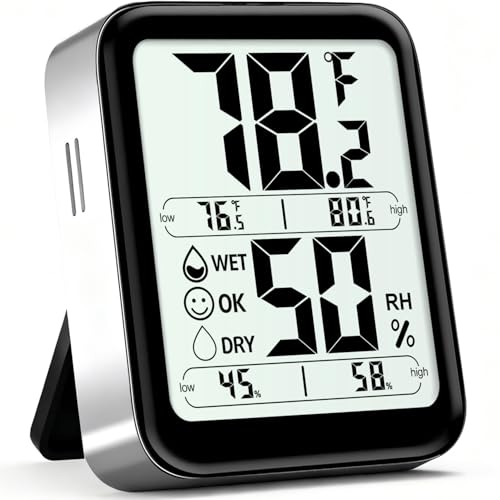
The Antonki Max Min model adds a feature the basic 2 Pack skips: a running record of the highest and lowest readings since your last reset. For plant parents and greenhouse keepers, that history is the difference between catching a dry spike at 2 a.m. and losing a tray of seedlings.
The display cycles between current conditions and stored highs and lows, and a DRY/OK/WET icon does the quick-glance job. Accuracy sits around plus or minus 5 percent RH and 2 degrees Fahrenheit, which is more than enough for hobby greenhouses and reptile rooms. The included battery keeps setup to a true unbox-and-place job.
The Upside
- Max/min memory catches the spikes you sleep through
- Comfort icon gives a fast read on the room’s status
- Single-unit design keeps things tidy on a shelf or greenhouse bench
Worth Noting
- No app or remote access, so you check the unit in person
- Looser accuracy spec than the Swiss-equipped Govee options
Spec Overview
Perfect Match For
Greenhouse hobbyists and plant-room keepers who need overnight climate history without a smart-home setup.
A Better Fit Elsewhere
The SwitchBot 2 Pack is the stronger pick for anyone who wants logged data on a phone rather than on a tiny screen.
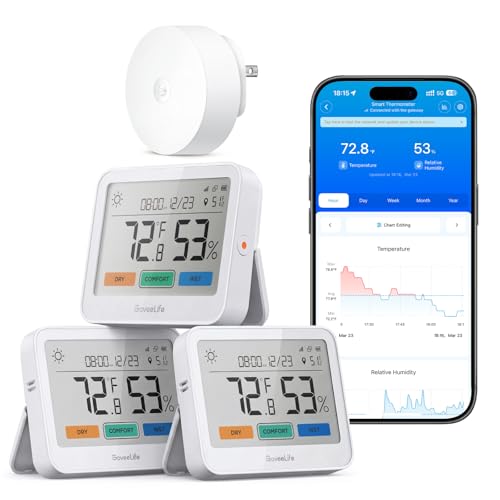
The 5-in-1 label describes what each sensor delivers: real-time temperature and humidity, a comfort indicator, trend lines, and a local weather forecast pulled through the Govee H5044 gateway. Three sensors in the box let you outfit a bedroom, an office, and a basement from one purchase.
The open-air range stretches to about 1,640 feet when paired with the gateway, which helps in larger homes and buildings with thick walls. The trade-off shows up when you want simple readings without leaning on the app, since the LCD is informative but the real value is the data feed. The earlier GoveeLife 2.0 covers similar ground with a smaller form factor if you don’t need the forecast layer.
Real-World Strengths
- Local weather forecast on the device itself
- Three sensors with strong gateway range
- Color-coded comfort indicator reads at a glance
Things To Consider
- Full feature set depends on adding the gateway
- Bigger screen footprint than the mini sensors
Made For
Whole-home climate tracking in mid-to-large houses where forecast data and trend history matter.
Where A Sibling Pick Shines
The GoveeLife 2.0 mini kit is the cleaner option when you want compact sensors and don’t need the built-in forecast.
The SwitchBot 2 Pack leans on a Swiss-made sensor that delivers tight tolerances, with temperature accuracy around plus or minus 0.4 degrees Fahrenheit and humidity around plus or minus 2 percent relative humidity. The internal sampling rate runs roughly 10 times per second, which is overkill for casual use but welcome if you track data closely.
The companion app exports your logged data, so you can build a year-long humidity history for a single room without setting up a full smart-home hub. The big LCD keeps the at-a-glance experience competitive with the Govee H5220. Compared to the GoveeLife 2.0 kit, this set focuses on accuracy and export rather than remote alerts and gateway range.
What Makes Sense
- Swiss sensor with tight accuracy spec
- Data export from the app supports real record-keeping
- Two units give you a comparison point across rooms
Less-Strong Areas
- Bluetooth range requires you to be nearby for live syncing
- Full benefit requires engaging with the app, unlike a glance-and-go sensor
Quick Facts
Who Should Grab It
Data-driven homeowners and hobbyists who want accurate readings and exportable history over flashy extras.
Swap It Out When
The GoveeLife 2.0 Wi-Fi kit is the smarter pick if remote alerts and gateway range matter more than data export.
Choosing The Right Home Humidity Meter For Your Space
Accuracy And Sensor Type
Relative humidity (RH) is the percentage of moisture the air holds compared to its maximum at a given temperature, and a meter that reads within 3 to 5 percent RH is plenty for most comfort-driven use. If you store cigars, run a greenhouse, or care for a reptile, tighter specs like the SwitchBot’s plus or minus 2 percent make a real difference. The Antonki units handle general household monitoring well at a looser tolerance.
Connectivity And Range
Bluetooth-only sensors like the SwitchBot and the H5220 without a gateway keep things simple but limit you to nearby check-ins. Wi-Fi kits with a gateway like the GoveeLife 2.0 and 5-in-1 push alerts to your phone from anywhere, which matters in vacation properties and basements you don’t visit daily. For a one-room project, a no-app sensor can be the right call.
Display And Readability
Large LCDs on the Govee H5220, the 5-in-1, and the SwitchBot read clearly from a few feet away. Mini sensors without displays trade the at-a-glance readout for compact placement and remote access. Comfort icons (DRY/COMFORT/WET or DRY/OK/WET) shorten the interpretation step when you just want to know whether to crack a window or run a humidifier.
Power And Placement
Battery life ranges from roughly two years on the GoveeLife 2.0 sensors to shorter cycles on simpler units. Placement matters more than brand: a sensor behind a curtain, on a cold exterior wall, or in direct sunlight will read wrong no matter how good the device is. A shaded spot at breathing height tends to give the most useful numbers.
Key Considerations Across These Picks
Mistakes Worth Dodging
Chasing the tightest accuracy spec on a sensor you’ll stick in a hallway usually means overpaying for precision you can’t use. Skipping placement planning is the bigger sin: a humidity meter perched on a windowsill in afternoon sun will tell you about the sun, not the room. You also want to confirm the connectivity band before you buy a Wi-Fi kit, since a 5 GHz-only router will leave a 2.4 GHz sensor stranded.
Where The Extra Money Goes
Higher-tier kits bundle more sensors, gateway range, and longer data history, which adds up when you want whole-home visibility. The premium also buys tighter tolerances and exportable data logs, which pay off for serious plant keepers and instrument collectors. For most rooms, though, a simple tabletop sensor delivers the comfort answers you actually need without the extras.
Frequently Asked Questions
How Often Should I Replace Batteries In A Home Humidity Meter?
Most AAA-powered sensors run anywhere from six months to two years depending on the model and refresh rate, so a quick yearly check keeps you covered. Smart sensors that push to an app will usually warn you when the battery dips low.
Where Should I Place A Humidity Meter In My Home?
Keep it away from windows, exterior walls, and heating vents so direct sun or drafts don’t skew the reading. A spot at chest height on an interior wall in the room you spend the most time in gives the most useful baseline.
Can One Sensor Cover A Whole House?
A single sensor can give you a rough idea, but humidity often varies sharply between floors and rooms, especially in homes with basements. Two or three sensors spread across living areas, bedrooms, and a damp-prone space give a much fuller picture.
Do I Need Wi-Fi To Use A Smart Humidity Meter?
Not always. Bluetooth models like the SwitchBot sync to your phone when you’re nearby, while Wi-Fi kits with a gateway push alerts from anywhere with a signal. The right choice depends on whether you want remote notifications or just a glanceable reading at home.
What’s A Healthy Indoor Humidity Range?
Most sources point to roughly 30 to 50 percent RH as a comfortable and healthy indoor band, with higher levels inviting mold and lower levels drying out skin and wood. The exact sweet spot shifts with outdoor temperature and personal comfort.
Closing Remarks
The right humidity meter comes down to where you’ll use it and how much data you actually want to see. A simple tabletop unit handles most everyday comfort questions, while a multi-sensor kit makes sense once you start tracking several rooms or specific storage environments. Pick the one that matches the space in front of you, and let the numbers guide the rest.