


Humidity shapes how a home actually feels. Run too dry in winter and wood floors shrink, lips crack, and guitars drift sharp; run too damp in summer and mildew blooms on bathroom grout, paper peels off basement walls, and a baby’s room starts to feel heavy. The fix starts with knowing what your air is doing, room by room, hour by hour.
A good hygrometer (a device that measures the moisture content in the air) does the quiet work of telling you when to run a humidifier, vent a bathroom, or crack a window. The eight models below cover the most common home situations: a single-room readout on a nightstand, a multi-room wireless network, and a pro-grade probe for HVAC techs. Pick the one that matches how you actually live, not the one with the most buttons.
The Choices Worth Comparing

TempPro TP49 Digital Hygrometer Indoor Thermometer
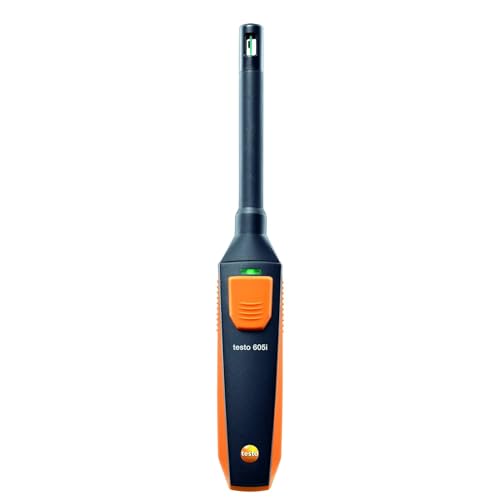
Testo 605i Thermohygrometer with Bluetooth

Govee WiFi Thermometer Hygrometer H5103

TempPro TempAir 500 FT Wireless Thermometer

TempPro TempAir Bluetooth Thermometer Hygrometer

Govee WiFi Thermometer Hygrometer H5179

SwitchBot Thermometer Hygrometer 2-Pack

Govee Indoor Hygrometer Thermometer H5075
The Strengths Of Each Pick
Plop it on a nightstand or a kitchen shelf and you are done, since the TempPro TP49 reads humidity and temperature on a clean LCD without any phone setup. The face icon in the corner flips between dry, comfort, and wet zones, so you do not have to remember that 40 to 60 percent is the comfort band for most living spaces. Compared to the Testo 605i covered below, this is the unit for someone who wants numbers, not a Bluetooth session.
It is small enough to tuck behind a humidifier, and the wide digits are easy to read from across the room. For most people starting out, it is the lowest-effort path to a useful humidity baseline.
A Favorable Mix
- Comfort face icon translates the number for you
- No app or pairing needed, runs on common coin cells
- Slim profile fits on a narrow shelf or windowsill
- Quick refresh keeps the reading current as rooms change
Things To Consider
- No data logging, so historical trends stay invisible
- Display sits dim in a dark bedroom without a nearby lamp
Made For
Anyone who wants a no-fuss readout in a single room, especially a bedroom or nursery where a quick glance beats an app.
Where Another Pick Suits Better
Reach for the Govee H5179 if you want push alerts on your phone whenever a room drifts out of range.
The Testo 605i is a probe first, a display second. The thin sensing head bends to 90 degrees so it can reach into supply ducts, behind a register, or down into a crawl space where a chunky tabletop unit simply will not fit. Readings stream to the Testo app on iOS or Android, which keeps a live graph and lets you log measurements for an inspection report.
Where the TempPro TP49 sits on a shelf and does one room, this one travels with the job. HVAC contractors, home inspectors, and serious DIYers will get the most out of it.
Useful Touches
- Bendable probe reaches tight duct and register openings
- Live app graph for spot readings and short logging sessions
- Pairs with both iOS and Android without a separate hub
- Carries the Testo reputation for measurement-grade accuracy
Points To Keep In Mind
- Requires a phone for any reading beyond the most basic functions
- Priced higher than most consumer tabletop hygrometers
Key Specs
Whose Shelf It Belongs On
HVAC technicians, energy auditors, and homeowners chasing a real duct or attic diagnosis.
Look Elsewhere When
Pick the Govee H5075 if you only need a casual living-room reading and would rather skip the probe entirely.
The H5103 swaps the usual backlit LCD for an e-ink panel, the same kind of low-power screen you find on a Kindle. That means the number stays readable in any light, from a dark nursery at 2 a.m. to a sunlit office window, and the unit sips battery instead of burning through coin cells. It also pushes data to the Govee Home app over a 2.4 GHz Wi-Fi link.
For a household that wants the device to be quietly visible, this is the most readable screen in the roundup. Compared to the simpler TempPro TP49, the trade is app setup in exchange for off-site monitoring and alerts.
Reasons It Performs
- E-ink display reads clearly in any lighting condition
- Wi-Fi link lets you check humidity from the office or the road
- App stores trends so you can spot seasonal patterns
- Long battery life thanks to the low-power screen
Honest Caveats
- Connects only to 2.4 GHz networks, not 5 GHz Wi-Fi
- Screen refresh is slower than a backlit LCD
Feature Snapshot
Right Fit For
Anyone who wants at-a-glance numbers on a shelf, plus the option to peek at the reading from a phone while away.
Not Your Match When
Skip this for the Govee H5179 if push alerts on out-of-range conditions are the main feature you care about.
Where most of the picks here live indoors, the TempPro TempAir ships with a wireless remote sensor that reads outside, in a garage, or in a detached greenhouse and beams the number back to a base station up to 500 feet away. The base shows indoor and outdoor temperature and humidity side by side, which makes it easy to compare the living room against the patio in a single glance.
This is the right pick for people whose humidity problem lives partly outside, whether that is a damp crawl space, a cold attic, or a sun-trap porch. Compared to the Govee H5103, you trade Wi-Fi alerts for a long radio link that works without a router at all.
The Practical Payoff
- Remote sensor reaches detached spaces without Wi-Fi
- Base station shows indoor and outdoor reads at once
- Tabletop or wall-mountable for flexible placement
- Runs on AAA batteries already in the box
Worth Bearing In Mind
- No app, so you must walk to the base station to read it
- Outdoor sensor needs occasional battery swaps in cold months
Best Suited To
Households with a yard, garage, or greenhouse that want a no-router readout of an outside space.
Swap It Out When
Pick the TempPro TempAir Bluetooth instead if you need phone-based logging and an exportable two-year record.
Greenhouse growers tend to care less about reading the moment and more about replaying a season. The TempPro TempAir Bluetooth tracks temperature and humidity to the app, then lets you export up to two years of history for a spreadsheet or a grow journal. The sensor pairs automatically once batteries go in, which keeps setup light for a hobbyist who just wants to start logging.
Compared to the Govee H5075 below, this one leans into longer-term data. You give up the always-on Wi-Fi remote view, and you gain an export that survives app updates and device changes.
Everyday Advantages
- Two-year exportable history for seasonal analysis
- Auto-pairing Bluetooth cuts the setup friction
- NTC sensor tracks fast humidity swings in a greenhouse
- Compact body fits on a propagation bench or shelf
Room For Improvement
- Bluetooth range can shorten through dense walls
- Export lives inside the app, not a live web dashboard
Spec Overview
Who Will Love This
Greenhouse hobbyists, propagation setups, and anyone who wants a season of data they can chart later.
Another Choice May Suit
Pick the Govee H5075 for a simpler Bluetooth experience if the two-year export feels like more than you need.
The H5179 is the pick for people who do not want to watch a number and instead want the device to tell them when something has gone wrong. You set a humidity floor and ceiling in the Govee Home app, and the unit pushes an alert to your phone the moment the room drifts outside that band. For a vacation home, a rental, or a basement that floods in storms, that early warning is the entire point.
Compared to the H5103, you trade the e-ink screen for active alerting. Where the SwitchBot 2-pack below gives you more rooms, this one focuses on sharper notifications from a single room.
A Strong Showing
- Push alerts fire when humidity crosses your setpoints
- Wi-Fi and Bluetooth give you a choice of how to connect
- Swiss-made sensor keeps the reading tight in normal ranges
- Compact form fits on a shelf, a desk, or a wall mount
Trade Offs
- Skips 5 GHz Wi-Fi, so dual-band routers must split networks
- Alerts only as useful as the setpoints you actually configure
Perfect Match For
Vacation homes, short-term rentals, and any space where you need to know about a humidity swing before the mildew does.
Skip It When
Choose the SwitchBot 2-pack if covering two or three rooms matters more than the alerting feature itself.
Most of the picks in this roundup cover one room well. The SwitchBot 2-pack covers two, with a generous LCD on each unit and a Bluetooth link to the SwitchBot app. Drop one in the nursery, one in the basement, and you have an at-a-glance pairing that finally answers the question every homeowner hits at some point: is the upstairs humidity the same as downstairs? Usually, it is not.
Compared to the Govee H5179, the trade is no push alerts and a smaller per-unit price, in exchange for genuine whole-home coverage from a single purchase.
What Helps Most
- Two units cover upstairs and downstairs in one order
- Large LCD stays readable across a room
- Swiss-made sensor gives tight readings in normal ranges
- App stores history and supports CSV export
Soft Spots
- Bluetooth range can drop behind thick basement walls
- No Wi-Fi means no alerts when you are off-site
Feature Card
Built With In Mind
Two-story homes, basements, and anyone who keeps asking why one floor feels different from the other.
A Better Fit Elsewhere
Pick the Govee H5179 if remote push alerts are a higher priority than covering multiple rooms.
The H5075 is the gentlest entry into app-based humidity tracking, pairing over Bluetooth to the Govee Home app without dragging you through a Wi-Fi setup. You get a small but clear reading on the device itself, plus a graph and history once it is paired. If you have never owned a smart sensor and the words “2.4 GHz network” make you tune out, start here.
Compared to the Govee H5179, you give up Wi-Fi and push alerts in exchange for a quicker, simpler first experience.
What Stands Out
- Simple Bluetooth pairing, no router configuration
- App graph shows recent swings at a glance
- Swiss-made sensor keeps home-range readings tight
- Compact body tucks on a shelf or windowsill
Points To Note
- Bluetooth tops out near 164 ft in open air, less through walls
- No remote alerts when you are off the home network
The Right Fit
First-time smart-sensor shoppers, renters, and anyone who wants a low-commitment way to start logging.
Where Another Pick Suits Better
Pick the Govee H5179 once you are ready for Wi-Fi and phone alerts beyond the home network.
What To Weigh Before Picking A Home Hygrometer
The right hygrometer depends less on feature lists and more on where it will live and what you want it to do. A few attributes tend to decide the choice for most people.
Accuracy and sensor type. Look for a stated tolerance in both temperature and relative humidity. Swiss-made sensors (high-precision components manufactured in Switzerland) tend to perform well in normal home ranges, while NTC sensors (thermistors that change resistance with temperature) react faster to swings, which matters in greenhouses and propagation tents. Most home sensors settle into a ±2 to 3 percent RH accuracy band, which is plenty for choosing when to run a humidifier.
Connectivity, not just display. A standalone LCD is the simplest path, and for many rooms it is enough. Wi-Fi adds remote monitoring and alerts, which matters for vacation homes and basements. Bluetooth costs less and skips the router, but it limits you to phone-range viewing. The right answer is the one that matches how often you want to check from another room or another city.
Form factor and placement. Tabletop units like the TempPro TP49 are easy to move around. Wall-mountable bases like the TempPro TempAir stay put in a high-traffic spot. Probe-style tools like the Testo 605i reach into ducts and registers, where no flat tabletop unit will ever go.
Data history and export. Short-term graphs help you decide tonight’s humidifier setting. Multi-month exports help a greenhouse grower compare seasons or a homeowner track down a mold problem to a specific week. Match the data window to the decision you are trying to make.
Key Considerations Across These Picks
Pitfalls Shoppers Hit
The most common mistake is buying on accuracy alone and ignoring placement. A hygrometer mounted above a kitchen stove or next to a bathroom vent will read a microclimate, not the room. Give the unit open air on an interior wall, away from windows, and leave it in one spot long enough to learn that spot’s pattern before you start chasing “bad” numbers.
The other slip is treating Wi-Fi as automatic. Units like the Govee H5103 and H5179 only join 2.4 GHz networks, so a router that broadcasts only 5 GHz will need a quick settings change. Check the router band before the device ships, not after.
Where The Extra Money Goes
Spending more usually buys a better sensor, app-based history, and remote alerts, not a fancier display. The Govee H5179 and H5103 sit above the basic TempPro TP49 because they push data off the device and into your phone, where trends and notifications become possible. The Testo 6059 is the costliest because its probe and Bluetooth app are tuned for professional HVAC work, not casual home use.
The upgrade is worth it once a humidity problem has a real consequence: a basement that mildews, a wine cellar that drifts, a greenhouse that wilts. For a single room and a single humidifier, a basic standalone unit is usually plenty.
Frequently Asked Questions
What humidity level should a home stay at? Most sources point to 40 to 60 percent relative humidity for general comfort, with lower targets in summer to discourage mold and higher ones in winter to ease dry skin and static.
Do I need Wi-Fi on a hygrometer? Only if you want to check the reading from another room or another city, or receive push alerts when the room drifts out of range. For a single-room readout, a Bluetooth or standalone unit is enough.
Can one hygrometer cover a whole house? Not reliably, since humidity often varies by a full story between upstairs and downstairs. A two-pack like the SwitchBot covers upstairs and basement without doubling the setup work.
How often do the batteries need changing? Most coin-cell units last around six to twelve months, while AAA-based sensors with e-ink displays, like the Govee H5103, can stretch much longer. Bluetooth and Wi-Fi units tend to drain faster when they retransmit often.
Where is the best place to put a hygrometer? On an interior wall, around chest height, away from windows, doors, and direct sunlight. Keep it out of kitchens and bathrooms unless you specifically want to measure those rooms.
The Takeaway
The right hygrometer is the one that quietly tells you what your air is doing, in the rooms that actually matter, without demanding attention. A basic standalone unit covers a bedroom, a Wi-Fi sensor covers a basement you cannot see, a two-pack covers a whole house, and a probe covers ducts and registers. Pick the model that matches the room and the decision you are trying to make, and the rest of the humidity puzzle tends to solve itself.